Home Planner AI: Room Interior
- 4.0
- Rating
- 10.00M
- Installs
- Free
- Price

 Analysis by App-foxy
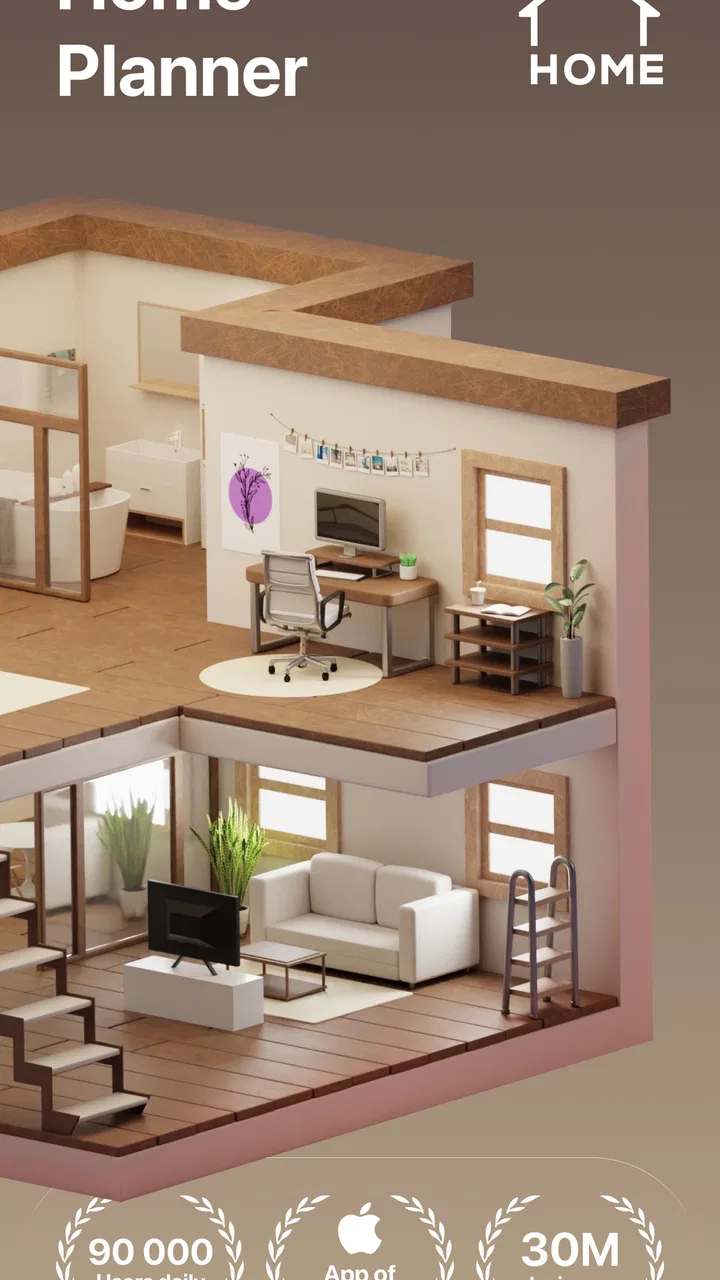
I used Home Planner AI: Room Interior as a practical way to think through room layouts, furniture arrangements, and decoration ideas before moving anything in real life. It is a house-and-home app from Room Planner Ltd, aimed at people who want to sketch out a home project without starting with professional design software. My first impression was that it works best as a visual planning companion: it helps turn a vague idea such as “the sofa feels wrong here” into a layout I can inspect, adjust, and discuss.
The app is free to download and is suitable for everyone, which makes it easy to try before deciding whether it fits your planning style. It has built a large audience, with over ten million installs, and its average score sits at 4.0 from around two hundred thirty-four thousand ratings. That combination suggests a mature, widely tested product, although the score also tells me not to expect a flawless experience on every device or for every kind of project.
Planning a room without guessing at every decision
What makes this app useful is the distance it creates between an idea and a costly mistake. Instead of shifting a bed, table, or cabinet repeatedly, I can experiment with a room arrangement first. That is especially helpful when a space has several competing demands: a living room that must also accommodate a work area, a bedroom where storage competes with walking space, or a small apartment where every placement affects another part of the room.
You May Also Like

 AccuWeather: Weather Radar
AccuWeather Review: A Quick, Clear Forecast for Everyday Decisions
For everyday plans, the best forecast is the one you can understand quickly. AccuWeather makes rain timing, radar, and local conditions easy to act on, with a few trade-offs.

 Hill Climb Racing
Why Hill Climb Racing Still Turns Crashes Into One More Run
A tiny car, a bumpy hill and one more upgrade: Hill Climb Racing keeps resurfacing because its simple chaos makes every near-miss feel personal.

 AliExpress - Shopping App
AliExpress Makes Global Shopping Feel Personal, but Shoppers Bear the Risk
AliExpress turns a global marketplace into a pocket-sized discovery engine. Its reach is useful, its shopping loop compelling, and its trade-offs easy to miss.

 Lords Mobile: Kingdom Wars
Lords Mobile Is a Kingdom-Building Routine, Not a Quick Match
A case-by-case verdict on the building, battles, device demands, and social commitments that make Lords Mobile rewarding for some players and exhausting for others.

 PDF Scanner app - TapScanner
TapScanner Makes Paperwork Easier to Capture, Check, and Share
TapScanner makes scanning with a phone feel less like a rescue operation and more like a dependable step in getting work done. Its capture tools are useful, though not flawless.

 Block Blast!
Block Blast! Shows How Much a Puzzle Game Can Leave Out
A quiet grid game shows why puzzle players increasingly value instant clarity, repeatable skill and low-pressure play—and where the genre still needs to catch up.
More From Our News Desk
View All News


I would not treat it as a replacement for an architect, contractor, or measured technical drawing. I see it more as the stage before those conversations. It gives me something concrete to react to, so I can compare alternatives rather than relying on memory or a quick sketch on paper. For a homeowner, renter, or decorator, that shift alone can make planning less frustrating.
The AI floor-plan angle is appealing for users who do not naturally think in diagrams. A blank page can be intimidating, while an assisted starting point feels more approachable. Still, the quality of any plan depends on the information and choices I put into it. A polished-looking room is not automatically a buildable room, and visual confidence should never replace checking real dimensions, doors, windows, outlets, radiators, or access routes.
How I would use it for an ordinary home project
Imagine that I am preparing to refresh a narrow living room. I first want to know whether a larger sofa would leave enough space to walk comfortably, where a television could go, and whether a small desk would make the room feel crowded. Rather than buying furniture immediately, I can test several arrangements and look for the one that balances seating, movement, and storage.
The important part of that workflow is comparison. I would save or review one arrangement with the desk near the window, another with the sofa turned toward a different wall, and a third that prioritizes open floor space. Even if the final result changes, the exercise exposes the tradeoff clearly: more seating may mean less circulation, while a larger storage unit may remove the flexibility that made the room feel comfortable.
For a renovation conversation, I would also use the app to prepare questions. A visual plan can help me ask whether a proposed cabinet blocks a doorway, whether a new partition makes sense, or whether the furniture layout leaves practical room for daily routines. It is much easier to discuss a specific arrangement than to explain an imagined one.
Where the free access fits into the decision
The app is free, so the sensible approach is to begin with a small project rather than committing money immediately. I can see whether the planning style feels natural, whether the visual output is useful for my room, and whether the workflow is comfortable on my device. That matters because room-planning tools are personal: some people prefer visual experimentation, while others work faster with graph paper, a measuring tape, or a desktop design program.
There are in-app purchases ranging from $1.99 to $399.99 for individual items. That is a very broad range, so I would not describe the full experience as simply “free” without qualification. Free access makes trying the app low-risk, but anyone considering paid content should inspect the exact item and its purpose before purchasing. The presence of a high upper price point means I would be particularly careful about tapping through purchase screens casually, especially when experimenting with several design ideas.
For me, the free entry point has real value because it answers the first and most important question: does this way of planning help me make better decisions? Paid spending only makes sense after that answer is yes. I would not buy something merely to make a room look more attractive in a preview; I would pay only when the added capability clearly saves time or improves a project I am genuinely working on.
What the app does well in practice
Its strongest quality is accessibility. A professional interior-design application can feel excessive when I only need to test a few furniture positions. Home Planner AI: Room Interior is much easier to justify for everyday decisions such as rearranging a bedroom, preparing a nursery concept, or exploring a decoration direction before shopping.
It is also useful as a communication tool. If two people share a home, they may imagine the same room very differently. A visual plan gives both of them something to examine. Instead of arguing over whether a layout will feel cramped, they can compare versions and identify the exact point of disagreement. That makes the app valuable even when the final plan is not used literally.
Another strength is reducing impulsive purchases. I can think I need a new sideboard, rug, or seating arrangement, then discover through planning that the real problem is placement rather than a lack of furniture. This is a subtle but important benefit: the app can encourage me to solve the room rather than simply add more objects to it.
I also like the possibility of separating the creative phase from the practical phase. First I can explore a preferred style and arrangement. Then I can step back and question it: is there enough room to clean, open drawers, carry laundry, or move around visitors? That second pass is where the tool becomes more than a decoration toy.
Limits I would keep in mind
The biggest limitation is that a visual plan can create a false sense of precision. Even when a room appears balanced on screen, real furniture has thickness, doors swing, people move unpredictably, and lighting changes throughout the day. I would measure the actual room and every important item before ordering anything. The app should support measurement-based thinking, not replace it.
There is also a difference between an attractive arrangement and a comfortable one. A composition may look neat while placing everyday objects too far away, narrowing a passage, or making cleaning awkward. I recommend imagining a normal morning rather than judging only the final image. Where do shoes go? Can someone open the wardrobe while another person walks past? Is the desk usable without glare? These questions reveal problems that a purely decorative view can hide.
Users looking for technical construction documentation may find the app too lightweight for their needs. If the project involves structural changes, electrical work, plumbing, exact material quantities, or contractor-ready drawings, I would move to professional tools and qualified advice. This app is better at early-stage visualization than at proving that a renovation is technically safe or compliant.
The purchase structure is another point of friction. Since individual in-app items can reach $399.99, I would treat every paid option as a separate value decision rather than assuming that one purchase unlocks everything I want. The free starting point is attractive, but the paid side requires discipline. I would decide what outcome I need first, then compare that outcome with the specific purchase instead of browsing without a plan.
Three smarter ways to get more from it
My first tip is to plan for circulation before decoration. I would begin with the largest fixed constraints and the routes I use every day. Only after those are comfortable would I add smaller furniture or styling choices. This prevents the common mistake of creating a beautiful arrangement that works only when nobody is walking through the room.
My second tip is to create deliberately different versions rather than making tiny changes to one layout. One version should prioritize storage, another open space, and another seating or work. The contrast makes the real tradeoff visible. Small adjustments can feel productive while leaving the underlying problem untouched.
My third tip is to use the app as a shopping filter. Before buying anything, I would test whether the item solves a specific problem and whether it forces an unwanted compromise elsewhere. This is especially useful in compact homes, where a single large purchase can affect the whole room. If the object does not improve the plan, I would postpone the purchase.
A fourth useful habit is to review a design at different times of day in my imagination. A desk that fits beside a window may still be uncomfortable if the light is harsh, and a reading corner may need more than visual space. The app can show arrangement, but I still need to apply knowledge of my routines, light, noise, and storage habits.
Who is likely to get the most value?
I think the best audience is someone who wants to make home decisions visually but does not need professional drafting. Renters can use it to explore furniture layouts before moving heavy items. First-time homeowners can use it to organize ideas before speaking with a decorator. Families can compare options together instead of relying on one person’s mental picture.
It is also a good fit for cautious shoppers. If I tend to buy furniture and regret the scale later, planning first can improve my judgment. The app is valuable even when it prevents a purchase, because avoiding an unsuitable item may be more useful than finding another attractive object.
People who should skip it are those who already work comfortably with precise architectural software or those who need certified plans. It may also be a poor match for someone who wants an instant, fully reliable answer without measuring or revising. Room design always involves judgment, and the app cannot remove that responsibility.
How it compares with familiar alternatives
Paper and pencil remain faster for a very rough first thought, especially when I only need to draw a sofa and a doorway. They are also free of interface learning. The weakness is that paper makes it harder to visualize depth, compare several versions, or communicate the idea to someone who is not standing beside me.
A general-purpose drawing app offers more freedom but less structure. I can sketch anything, yet I must create the symbols, proportions, and organization myself. Home Planner AI: Room Interior is more focused on home decisions, so it makes more sense when the central question is how a room works rather than how to produce an attractive illustration.
Professional interior-design software is the better choice for detailed specifications, complex renovations, or work that must be handed to specialists. Its advantage is precision and depth; its cost is usually a steeper learning curve and more effort. This app occupies the practical middle ground: more visual and reusable than a quick sketch, but less suitable for technical documentation.
My buying decision and final recommendation
I would recommend trying the free version if I were planning a room, moving into a new home, or debating a furniture purchase. The low-risk starting point is the clearest reason to install it. It can help organize ideas, expose layout problems, and make conversations with family members or professionals more concrete.
I would be cautious with paid purchases. The available in-app items range from $1.99 to $399.99, so the value depends entirely on the particular item and the seriousness of the project. I would not assume that spending more automatically produces a better design, and I would make sure the purchase addresses a real planning need rather than momentary curiosity.
Overall, I see this as a useful visual planning assistant, not a technical renovation authority. Its best result is not a perfect room rendered on screen; it is a better decision before money, time, and physical effort are committed. If that is what I need, the free access makes it worth exploring. If I need construction-grade accuracy or already have a precise professional workflow, I would choose a more specialized alternative instead.
The app has been available since December 17, 2016, and its current version is 2606, which places it in the category of established home-planning tools rather than a brand-new experiment. For an everyone-rated app developed by Room Planner Ltd, that maturity and broad adoption are reassuring starting points. My final verdict is simple: try it for visualization, measure everything in the real room, and treat paid options as deliberate purchases rather than automatic upgrades.
FAQs for Home Planner AI: Room Interior
01What is Home Planner AI: Room Interior, and how does it work?
Home Planner AI: Room Interior is a cutting-edge app designed to help users visualize and plan their interior spaces using artificial intelligence. It allows you to upload photos of your room, and then it provides design suggestions based on your preferences. The app leverages AI to offer furniture arrangements, color schemes, and decor ideas that suit your style and space dimensions.
02Is Home Planner AI: Room Interior free to use?
The app offers a free version with basic features, allowing users to try out essential functionalities such as layout planning and style suggestions. However, advanced features, including premium design templates and personalized consultations, may require in-app purchases or a subscription. Check the app store listing for detailed pricing information.
03Can I use Home Planner AI: Room Interior offline?
Home Planner AI: Room Interior requires an internet connection to access its full range of features, especially those that rely on AI processing and cloud storage. While some basic functionalities may be available offline, such as viewing saved projects, an online connection is recommended for the best experience and to access the latest updates and resources.
04How accurate are the design suggestions provided by Home Planner AI: Room Interior?
The app uses advanced AI algorithms to analyze your space and preferences, offering design suggestions that are highly accurate and personalized. However, the accuracy can vary depending on the quality of the input photos and the specificity of the user's preferences. It’s always a good idea to use the suggestions as a starting point and make adjustments as needed.
05Can I share my designs from Home Planner AI: Room Interior with others?
Yes, Home Planner AI: Room Interior allows you to share your design projects with friends, family, or professional designers. You can export your plans in various formats or share them directly via social media or email from within the app. This feature is great for collaborative projects or getting feedback from others.
Pros
- User-friendly interface makes planning easy.
- AI suggestions for room designs are helpful.
- Wide variety of furniture and decor options.
- 3D visualization enhances the design experience.
- Easy to save and share design plans.
Cons
- Limited free features; subscription required.
- Occasional lag in 3D rendering.
- Some AI suggestions lack personalization.
- In-app purchases can add up quickly.
- Requires a stable internet connection.

Home Planner AI: Room Interior
Gallery